MSRX Split
Split trip costs with friends, with budgets, a forecast and answers to your spending questions, and nothing stored on a server
Updated — Budgets, a trip forecast and Ask Split
Overview
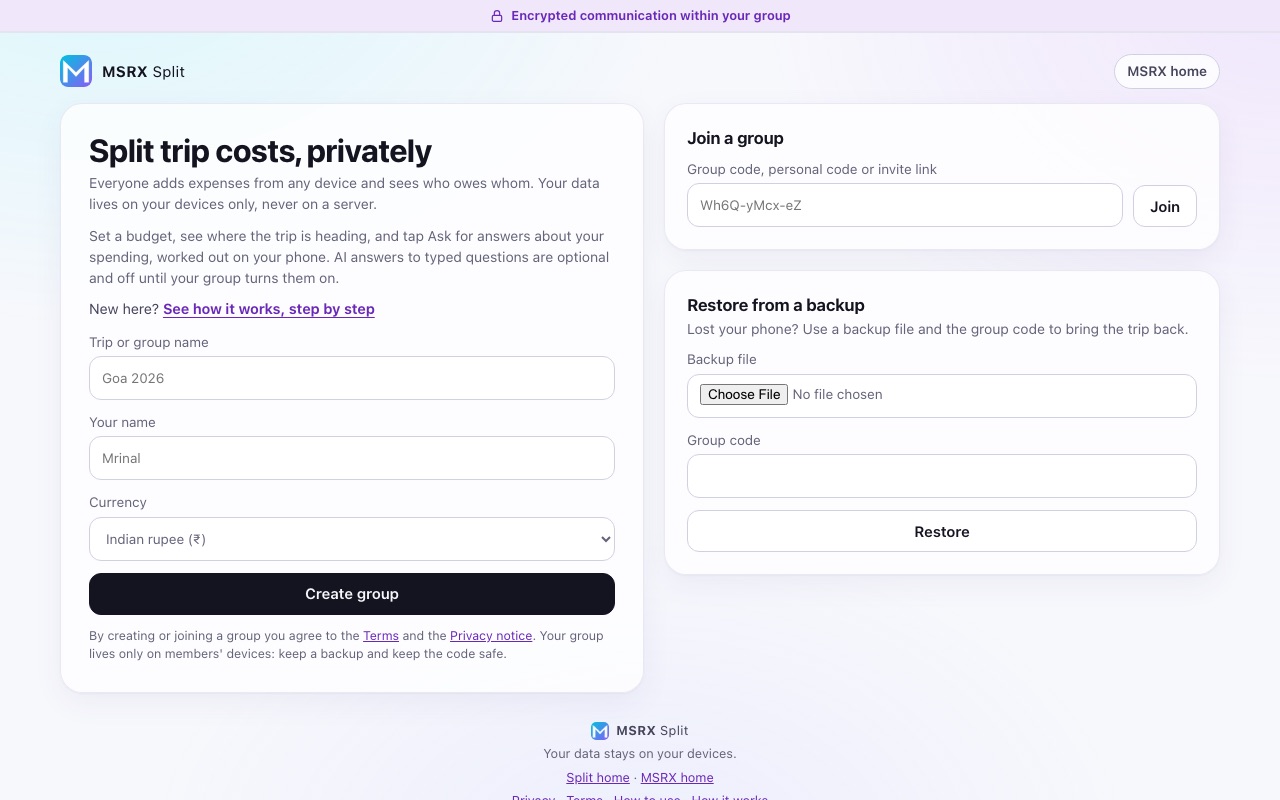
A web app for sharing costs on a trip or in a household, with no account and no server holding your group. The person who creates a group is its admin and gets a random 10-character code. Admins add people, and each new person appears with their own short personal link right beside their name: whoever opens it first sees who runs the group and the terms, agrees, and then joins as that person, and can edit their name or leave and rejoin later. Tap anyone to see what they have put in: what they paid, their share, their balance, how much of the group's spending they covered, and every entry they were part of. Admins can also make other admins, remove and restore people, rename the group and close the trip, and if the only admin leaves the member who joined next takes over. Anyone can add an expense at any time, paid by them by default or optionally by someone else, split equally, by exact amount, by percentage or by shares, in several currencies, with the group settled in the fewest payments. Charts on the expenses tab show what each person paid against their share and which items cost the most. The expense form shows each share as you type and will not save a split that does not add up, and deleting an expense or marking a debt paid comes with an Undo. The data lives in each member's own browser, and devices that are online together sync directly, with a relay as the fallback on networks that block direct links. A longer, offline-ready link also carries a compact copy of the group, so a new member sees it even when nobody else is online. Every screen says that communication within your group is encrypted, and a how-it-works page explains the app in plain words and in engineering detail. Admin actions are listed in an activity list every member can read. Admin roles are rules the app follows, not a lock, and removing someone does not cut off a person who still has the group code, so to really shut someone out an admin can move the group to a new one with a new code, carrying over everyone's history and balances and leaving that person behind. Because nothing is kept on a server, if every device holding a group is lost and nobody made a backup, the group is gone, so the app offers an encrypted backup file that restores a whole trip from just the file and the code, a spreadsheet export, and a reminder once a trip has real content. Free, installable, and it keeps working offline, with a layout that uses the width of a laptop screen as well as a phone. A step-by-step guide with phone screenshots, linked from the home screen, shows new users how everything works. An At a glance card shows the spend a day, a forecast to the trip's last day and a budget bar set by the admin, and an Ask button answers common questions about the trip from the phone's own copy of the data. Typed questions can use AI if the admin turns it on and each person agrees on their own phone; names are replaced with labels before anything is sent, and expense titles, the group's name and its code never leave the phone.
What it does
- Create a group with a random 10-character code; invite each person by a short personal link through WhatsApp, SMS, email or your share sheet
- Opening an invite shows who runs the group and the terms, and nothing is saved until you agree
- Admins add people, and each new person gets their own personal link beside their name
- Tap anyone to see what they paid, their share, their balance and every entry they were part of
- The creator is admin; admins make other admins, remove and restore people, and the next joiner takes over if the only admin leaves
- Edit your name, and leave or rejoin without changing anyone's history or balance
- Anyone adds expenses from any device, paid by them by default or optionally by someone else
- Split equally, by exact amount, by percentage or by shares, in several currencies, with each share shown as you type and a check that the split adds up before it saves
- Delete an expense or mark a debt paid in one tap, with Undo
- Expenses grouped by day, each saying how it was split
- Spending charts by person and by item, showing who paid what and which expenses cost the most
- Settle the whole group in the fewest payments, and record payments as they happen
- Data stays on members' devices; no account and no server copy of the group
- Devices sync directly, encrypted, with a relay fallback for networks that block direct links
- Everything received from other devices is checked first, so one bad entry cannot break a group
- A longer offline-ready link carries a copy of the group for when nobody else is online
- Move a group to a new code to really shut someone out, keeping everyone's history and balances
- An activity list of admin actions that every member can read
- Encrypted backup file that restores a trip from just the file and the code, plus a spreadsheet export
- Installable, and works offline, on phones and laptops
- A step-by-step how-to-use guide with phone screenshots, linked from the app's home screen, now covering budgets, the forecast and Ask
- At a glance: spend a day, a forecast to the trip's last day, and a budget bar with a warning when it is nearly used
- Ask Split answers common questions (what you owe, who paid most, where the money went, who pays whom) on your phone
- Optional AI answers to typed questions: the admin turns them on inside Ask, each person agrees on their own phone, and names are replaced before anything is sent