MSRX Drive
A private file manager in your browser: browse, search, preview and organise folders with nothing uploaded
Updated — Trash, tabs, two panes, search inside files, zip and PDF tools
Overview
A free file manager that runs entirely in your browser. Open a folder on your computer and browse it in list or icon view with photo thumbnails, search every folder below it as you type, press Space to preview photos, video, audio, PDFs, text, code, CSV files as a table and formatted JSON, and see sizes, folder totals, image dimensions and video length in an Info panel. In Chrome and Edge on a computer it can create folders and text files, rename, duplicate, copy, cut and paste, drag items onto a folder to move them, drag files in from the desktop, and delete. Copies never overwrite without asking: a name clash offers Replace, Skip or Keep both, and replaced or deleted items go to the app's own Trash for 30 days. Tabs, a second pane, search inside documents and PDFs, zip files and PDF page tools are built in. It works on Windows, Mac, Linux and ChromeOS with each platform's own shortcuts, and checks names against Windows rules so files stay usable everywhere. Safari, Firefox, iPhone, iPad and Android get My space, a private folder inside the browser with every feature, and can also open folders view-only; a long press opens the menu on touch screens. A built-in sample folder, kept in the browser's private storage, lets anyone try it before opening their own files. It also helps free up space: a storage map shows what is taking room and lets you click into any folder, a duplicate finder compares file contents (not just names) and keeps the oldest copy by default, smart views list the largest files, recent changes, every photo, video or document, and files not opened in a year across a whole folder tree, and Clean up sorts a messy folder into subfolders by type or month after showing you the plan. Many items can be renamed at once with a live preview, text and Markdown files can be edited and saved in place, and Undo reverses renames, moves, copies and clean-ups. Folders are remembered between visits, with Favorites, Recents, a command palette, keyboard shortcuts, light and dark themes and offline use once installed. Files are read and changed only on your computer: there is no server, the site's security policy blocks it from sending data anywhere, and there is no account, analytics or advertising.
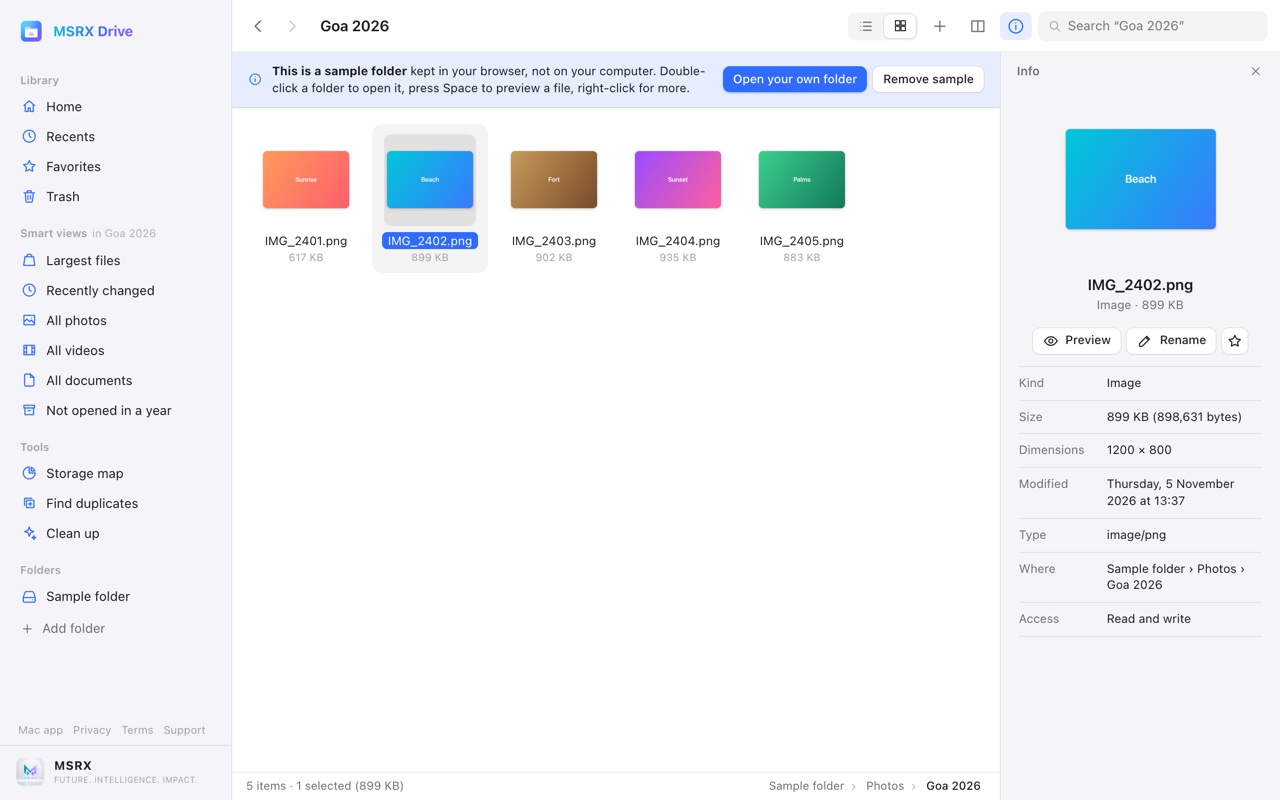
What it does
- Browse folders in list or icon view with photo thumbnails
- Search a whole folder tree as you type
- Quick Look previews for photos, video, audio, PDF, text, code, CSV and JSON
- Rename, duplicate, copy, move and delete in Chrome and Edge on Windows, Mac, Linux and ChromeOS
- My space: every feature in Safari, Firefox, iPhone, iPad and Android, kept inside the browser
- A 30-day Trash, so deletes can be put back
- Tabs and a second pane for moving files between folders
- Search inside documents, PDFs and Office files, with filters and saved searches
- Zip and unzip, and combine, reorder, rotate or split PDFs
- Storage map, duplicate finder and Clean up to free space
- Smart views: largest files, recent changes, all photos, videos and documents
- Batch rename with live preview, a text and Markdown editor, and Undo
- Name clashes ask first; replaced items go to the Trash
- Built-in sample folder to try it without your own files
- Nothing uploaded: no server, no account, no analytics, works offline